

Behind the Screens: Designing and Building a Node.js Ad Campaign System
I am the type of person who keeps away from screens because they distract me. I know that sounds weird given my profession, but I'm not going to talk about my approach to digital well-being here (that's a story for another article). Recently, I noticed some digital screens distributed around the city center where I live. In general, I don't like ads, too many screens, or too many blinking colors, but one thing came to my mind: how the heck do they create a system of distributed screens showing what they want? What if they lose connection? How do campaigns keep running on those screens? Additionally, I realized that the technology I like and specialize in could be a good fit for such a system. I decided to take on the challenge of designing such a system and building a POC of it. Moreover, I had recently started to focus more on solving "system design problems." So let's dive into it.
Gathering functional and non-functional requirements
Before starting to draw any diagram, we need to gather the requirements and state them clearly. The best way to do it is to start by sorting them into functional and non-functional requirements.
Functional requirements
- The user shall be able to create a campaign by defining metadata, a schedule, and assets
- The user shall be able to see all of their campaigns
- The system shall create the ad from the metadata and assets sent by the user
- Ads shall be displayed according to schedule on the selected devices (screens)
- The system shall be able to cancel the selected campaign
Non-functional requirements
- The system shall handle up to 500 concurrent requests for campaign creation
- The system shall push campaigns to up to 20000 screens concurrently
- Campaign creation shall be idempotent
- A campaign shall start within 1 second of the scheduled time
- Screens shall send acknowledgments to the backend immediately after installing the ad on the device
- Screens shall continue to work offline while still starting campaigns according to schedule
Defining the core components of the system
As you can see, the task is not trivial. To meet all of these requirements, we will have to define three main layers of the application:
- Admin UI dashboard - handles campaign creation by adding metadata and assets, and lists the created campaigns and their status.
- Backend - will include components such as the dashboard API, a template worker for creating and storing templates, a database for storing metadata, a publisher for publishing campaigns to devices, and an ack consumer that will receive messages from devices to keep track of the state of campaign publishing. The workers will be connected through a persistent job queue.
- Screens frontend - will be a simple vanilla JS app that will receive the campaign manifest, install the campaign in the cache, run campaigns, and notify the backend about the publishing status.
NOTE: For this design, we will not talk about authentication and authorization. The example repo does not implement them either. In this article, I'd like to focus solely on the core idea of the screen-based campaign system.
Data flow and system design diagram
The best way to understand how the components of the system work is to draw a diagram. After analyzing it, we will have a clear high-level overview of the system.
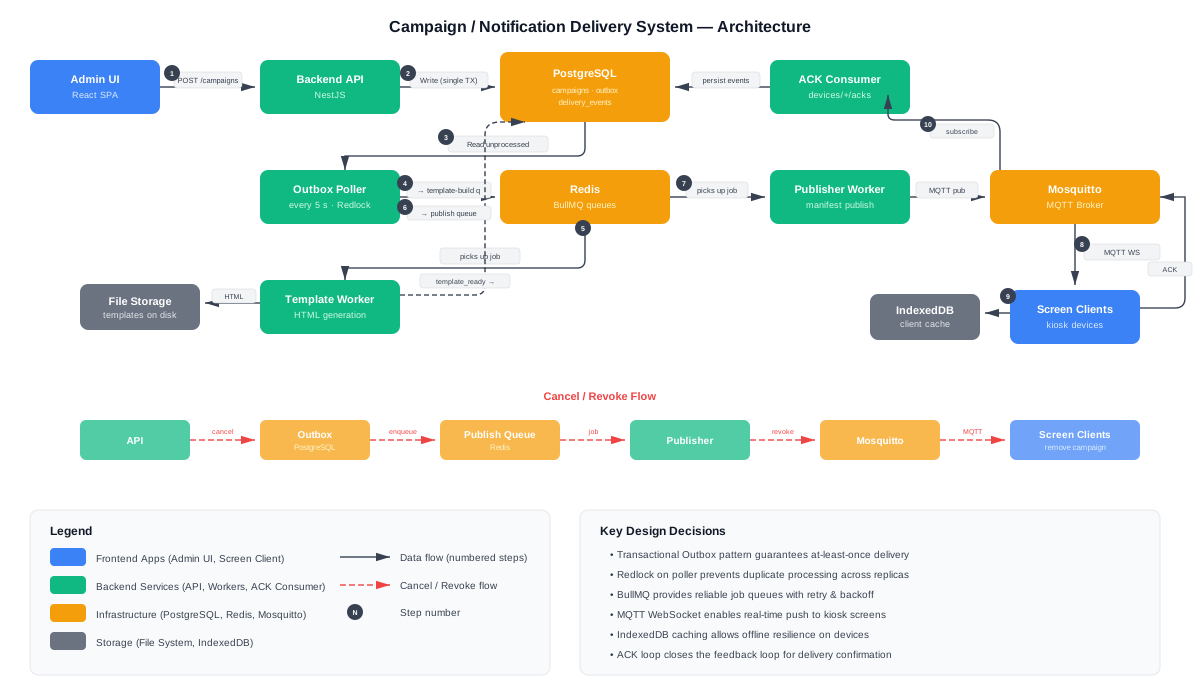
The flow works in a kind of feedback loop triggered from the Admin UI, where we have: request -> API -> compute template, create manifest -> publish to the screens -> send ack to the backend, which closes the feedback loop. Backend services communicate via BullMQ. The backend also has file storage (it's just a file system for the needs of this POC, but it can be object storage or whatever else fits your needs). Consistency and atomicity are ensured by using the outbox pattern when registering events for creating and cancelling campaigns and creating the template. The POST request for creating a new campaign requires an idempotency key, which prevents multiple jobs for the same campaign. Without idempotency, this can be hard to bear, especially at scale, because creating a template and storing campaign assets are not trivial tasks, and it is obvious that there cannot be duplicates in the system. From the start, we will use a read replica for read operations as a deliberate scalability choice, because even in a moderate-traffic scenario, background processes are write-heavy and can quickly impact read performance, resulting in a poor user experience.
Data Model
The data model in this case is simple. For this POC project, we will create four core domain entities: device, campaign, campaign asset, and delivery event. In addition, we will use an outbox table to support reliable internal event processing. In the future, the data model can be extended with users, teams, etc.
Here is the minimal data model for the application, including the outbox table:
Table: campaigns
SQL
CREATE TABLE campaigns (
  id uuid NOT NULL DEFAULT uuid_generate_v4(),
  name text NOT NULL,
  version integer NOT NULL DEFAULT 1,
  start_at bigint NOT NULL,
  expire_at bigint NOT NULL,
  metadata jsonb,
  status campaigns_status_enum NOT NULL DEFAULT 'draft',
  created_by text,
  idempotency_key uuid,
  created_at timestamp NOT NULL DEFAULT now(),
  updated_at timestamp NOT NULL DEFAULT now(),
  PRIMARY KEY (id)
);

CREATE INDEX idx_campaigns_start_at ON campaigns (start_at);Table: devices
SQL
CREATE TABLE devices (
  device_id text NOT NULL,
  group_id text,
  last_seen timestamptz,
  status devices_status_enum NOT NULL DEFAULT 'offline',
  metadata jsonb,
  PRIMARY KEY (device_id)
);Table: campaign_assets
SQL
CREATE TABLE campaign_assets (
  id uuid NOT NULL DEFAULT uuid_generate_v4(),
  campaign_id uuid NOT NULL,
  asset_type campaign_assets_asset_type_enum NOT NULL,
  url text NOT NULL,
  checksum text,
  duration_ms integer,
  size_bytes bigint,
  created_at timestamp NOT NULL DEFAULT now(),
  PRIMARY KEY (id),
  FOREIGN KEY (campaign_id) REFERENCES campaigns(id) ON DELETE CASCADE
);Table: delivery_events
SQL
CREATE TABLE delivery_events (
  id uuid NOT NULL DEFAULT uuid_generate_v4(),
  event_id uuid NOT NULL,
  device_id text NOT NULL,
  campaign_id uuid NOT NULL,
  version integer NOT NULL,
  event_type delivery_events_event_type_enum NOT NULL,
  asset_id uuid,
  payload jsonb,
  created_at timestamp NOT NULL DEFAULT now(),
  PRIMARY KEY (id),
  UNIQUE (event_id),
  FOREIGN KEY (device_id) REFERENCES devices(device_id) ON DELETE CASCADE,
  FOREIGN KEY (campaign_id) REFERENCES campaigns(id) ON DELETE CASCADE
);

CREATE INDEX idx_delivery_events_device_id ON delivery_events (device_id);
CREATE INDEX idx_delivery_events_campaign_id ON delivery_events (campaign_id);Table: outbox
SQL
CREATE TABLE outbox (
  id uuid NOT NULL DEFAULT uuid_generate_v4(),
  aggregate_type text NOT NULL,
  aggregate_id uuid NOT NULL,
  event_type text NOT NULL,
  payload jsonb NOT NULL,
  processed boolean NOT NULL DEFAULT false,
  created_at timestamp NOT NULL DEFAULT now(),
  processed_at timestamptz,
  locked_by text,
  locked_at timestamptz,
  PRIMARY KEY (id)
);

CREATE INDEX idx_outbox_processed_locked_at_created_at ON outbox (processed, locked_at, created_at);As you can see, the entire data model at this point is simple and covers storing assets and associating campaigns with devices through the delivery_events table, as well as supporting the outbox pattern. There are no filters in the Admin UI yet, so the indexes in the presented design are not sophisticated.
Project structure
The project structure is organized as a monorepo that consists of the Admin UI, the backend with all significant backend services as modules such as the API, publisher, outbox service, and template worker, as well as the screen app. At this stage, all backend services will have a single source of truth, which is an SQL database.
In order to discuss the choices, trade-offs, and patterns, we need to zoom in a little on the services.
Admin UI
The Admin UI is responsible for creating, reading, and cancelling campaigns. To build this service, I used React + Vite + TanStack Query.
Here is the client-side API integration for those cases:
typescript
async function fetchCampaigns({ page, limit }: FetchCampaignsParams) {
  const offset = (page - 1) * limit;
  const data = await apiFetch<CampaignListResponse>(
    `/campaigns?offset=${offset}&limit=${limit}`,
  );
  return {
    ...data,
    page,
    totalPages: Math.ceil(data.total / limit),
  };
}

async function createCampaign(payload: CreateCampaignPayload) {
  return apiFetch<CampaignResponse>("/campaigns", {
    method: "POST",
    body: JSON.stringify(payload),
  });
}

async function cancelCampaign(id: string) {
  return apiFetch<CampaignResponse>(`/campaigns/${id}/cancel`, {
    method: "POST",
  });
}These API fetchers are wrapped with TanStack Query hooks and used in the form and the list below:
Paginated Table
JSX
function CampaignTable() {
  const [page, setPage] = useState(1);
  const { data, isLoading, isError, error, isPlaceholderData } = useCampaigns({
    page,
    limit: PAGE_SIZE,
  });
  const cancelCampaign = useCancelCampaign();

  if (isLoading) {
    return (
      <Card>
        <CardHeader>
          <CardTitle>Campaigns</CardTitle>
        </CardHeader>
        <CardContent>
          <p className="text-sm text-muted-foreground">Loading campaigns...</p>
        </CardContent>
      </Card>
    );
  }

  if (isError) {
    return (
      <Card>
        <CardHeader>
          <CardTitle>Campaigns</CardTitle>
        </CardHeader>
        <CardContent>
          <p className="text-sm text-destructive">
            {error?.message || "Failed to load campaigns"}
          </p>
        </CardContent>
      </Card>
    );
  }

  const campaigns = data?.data ?? [];
  const totalPages = data?.totalPages ?? 1;
  const total = data?.total ?? 0;

  if (campaigns.length === 0 && page === 1) {
    return (
      <Card>
        <CardHeader>
          <CardTitle>Campaigns</CardTitle>
        </CardHeader>
        <CardContent>
          <p className="text-sm text-muted-foreground">
            No campaigns found. Create one below.
          </p>
        </CardContent>
      </Card>
    );
  }

  return (
    <Card>
      <CardHeader>
        <CardTitle>Campaigns</CardTitle>
      </CardHeader>
      <CardContent className="space-y-4">
        <Table>
          <TableHeader>
            <TableRow>
              <TableHead>Name</TableHead>
              <TableHead>Status</TableHead>
              <TableHead>Start At</TableHead>
              <TableHead>Expire At</TableHead>
              <TableHead>Version</TableHead>
              <TableHead>Created At</TableHead>
              <TableHead className="w-[50px]" />
            </TableRow>
          </TableHeader>
          <TableBody>
            {campaigns.map((campaign) => (
              <TableRow key={campaign.id}>
                <TableCell className="font-medium">{campaign.name}</TableCell>
                <TableCell>
                  <Badge
                    variant={STATUS_VARIANT_MAP[campaign.status] ?? "secondary"}
                  >
                    {campaign.status}
                  </Badge>
                </TableCell>
                <TableCell>{formatDate(campaign.startAt)}</TableCell>
                <TableCell>{formatDate(campaign.expireAt)}</TableCell>
                <TableCell>{campaign.version}</TableCell>
                <TableCell>{formatDate(campaign.createdAt)}</TableCell>
                <TableCell>
                  {campaign.status !== "cancelled" && (
                    <Button
                      variant="ghost"
                      size="icon-sm"
                      disabled={cancelCampaign.isPending}
                      onClick={() => cancelCampaign.mutate(campaign.id)}
                    >
                      <CircleX className="text-muted-foreground" />
                    </Button>
                  )}
                </TableCell>
              </TableRow>
            ))}
          </TableBody>
        </Table>
        <div className="flex items-center justify-between">
          <p className="text-sm text-muted-foreground">
            {total} {total === 1 ? "campaign" : "campaigns"} total
          </p>
          <div className="flex items-center gap-2">
            <Button
              variant="outline"
              size="icon-sm"
              disabled={page <= 1}
              onClick={() => setPage((p) => Math.max(1, p - 1))}
            >
              <ChevronLeft />
            </Button>
            <span className="text-sm tabular-nums">
              {page} / {totalPages}
            </span>
            <Button
              variant="outline"
              size="icon-sm"
              disabled={page >= totalPages || isPlaceholderData}
              onClick={() => setPage((p) => p + 1)}
            >
              <ChevronRight />
            </Button>
          </div>
        </div>
      </CardContent>
    </Card>
  );
}Form
JSX
function CampaignForm() {
  const createCampaign = useCreateCampaign();

  const {
    register,
    handleSubmit,
    control,
    reset,
    formState: { errors },
  } = useForm<CreateCampaignInput>({
    resolver: zodResolver(createCampaignSchema),
    defaultValues: {
      name: "",
      startAt: "",
      expireAt: "",
      assets: [{ assetType: "image", url: "", durationMs: undefined }],
    },
  });

  const { fields, append, remove } = useFieldArray({
    control,
    name: "assets",
  });

  function onSubmit(data: CreateCampaignInput) {
    const idempotencyKey = crypto.randomUUID();

    createCampaign.mutate(
      {
        name: data.name,
        startAt: new Date(data.startAt).getTime(),
        expireAt: new Date(data.expireAt).getTime(),
        assets: data.assets.map((asset) => ({
          assetType: asset.assetType,
          url: asset.url,
          durationMs: asset.durationMs,
        })),
        idempotencyKey,
      },
      {
        onSuccess: () => {
          toast.success("Campaign created successfully");
          reset();
        },
        onError: (error) => {
          toast.error(error.message || "Failed to create campaign");
        },
      },
    );
  }

  return (
    <Card>
      <CardHeader>
        <CardTitle>Create Campaign</CardTitle>
      </CardHeader>
      <CardContent>
        <form onSubmit={handleSubmit(onSubmit)} className="space-y-4">
          <div className="space-y-1.5">
            <Label htmlFor="name">Name</Label>
            <Input
              id="name"
              placeholder="Campaign name"
              {...register("name")}
            />
            {errors.name && (
              <p className="text-sm text-destructive">{errors.name.message}</p>
            )}
          </div>

          <div className="grid grid-cols-2 gap-4">
            <div className="space-y-1.5">
              <Label htmlFor="startAt">Start At</Label>
              <Input
                id="startAt"
                type="datetime-local"
                {...register("startAt")}
              />
              {errors.startAt && (
                <p className="text-sm text-destructive">
                  {errors.startAt.message}
                </p>
              )}
            </div>
            <div className="space-y-1.5">
              <Label htmlFor="expireAt">Expire At</Label>
              <Input
                id="expireAt"
                type="datetime-local"
                {...register("expireAt")}
              />
              {errors.expireAt && (
                <p className="text-sm text-destructive">
                  {errors.expireAt.message}
                </p>
              )}
            </div>
          </div>

          <div className="space-y-2">
            <div className="flex items-center justify-between">
              <Label>Assets</Label>
              <Button
                type="button"
                variant="outline"
                size="sm"
                onClick={() =>
                  append({ assetType: "image", url: "", durationMs: undefined })
                }
              >
                <PlusIcon className="size-4 mr-1" />
                Add Asset
              </Button>
            </div>
            {errors.assets?.root && (
              <p className="text-sm text-destructive">
                {errors.assets.root.message}
              </p>
            )}
            {fields.map((field, index) => (
              <div key={field.id} className="flex items-start gap-2">
                <select
                  {...register(`assets.${index}.assetType`)}
                  className="focus-visible:ring-3 h-8 rounded-lg border border-input bg-transparent px-2.5 text-sm outline-none focus-visible:border-ring focus-visible:ring-ring/50"
                >
                  <option value="image">Image</option>
                  <option value="video">Video</option>
                  <option value="html">HTML</option>
                </select>
                <div className="min-w-0 flex-1">
                  <Input
                    placeholder="Asset URL"
                    {...register(`assets.${index}.url`)}
                  />
                  {errors.assets?.[index]?.url && (
                    <p className="text-sm text-destructive">
                      {errors.assets[index].url.message}
                    </p>
                  )}
                </div>
                <Input
                  type="number"
                  placeholder="Duration (ms)"
                  className="w-36"
                  {...register(`assets.${index}.durationMs`, {
                    setValueAs: (v: string) =>
                      v === "" ? undefined : Number(v),
                  })}
                />
                {fields.length > 1 && (
                  <Button
                    type="button"
                    variant="ghost"
                    size="icon"
                    onClick={() => remove(index)}
                  >
                    <Trash2Icon className="size-4" />
                  </Button>
                )}
              </div>
            ))}
          </div>

          <Button type="submit" disabled={createCampaign.isPending}>
            {createCampaign.isPending ? "Creating..." : "Create Campaign"}
          </Button>
        </form>
      </CardContent>
    </Card>
  );
}One of the most important things from the perspective of the reliability and consistency of the entire system is that the Admin UI generates the idempotency key, ensuring that the same campaign creation request will be stored only once. This makes the request safe in situations where the client needs to retry it, there are double clicks, or other reasons cause the client to send a duplicate request. The service on the API backend side will later use this key when inserting the campaign into the database.
Why React, and why not React with a meta-framework?
I chose React + Vite from the start because it is an established and well-maintained stack, which is always good when the team needs to grow. In this case, I am not keen on picking any meta-framework. In my opinion, this project will not require read-heavy use cases that are often optimized by SSR, nor is there any need for optimized SEO in the case of an Admin UI dashboard.
Campaign API
For the backend services, I chose NestJS and PostgreSQL, with TypeORM used as the ORM layer.
The Campaign API is responsible for serving endpoints for the Admin UI and reflects the same tasks: campaign creation, campaign cancellation, and displaying the list of campaigns.
Let's zoom straight into its service:
typescript
import { Injectable, NotFoundException } from "@nestjs/common";
import { InjectRepository } from "@nestjs/typeorm";
import { DataSource, Repository } from "typeorm";
import { CampaignEntity, CampaignStatusEnum } from "./campaign.entity";
import { CampaignAssetEntity } from "./campaign-asset.entity";
import { OutboxEntity } from "../outbox/outbox.entity";
import { CreateCampaignDto } from "./dtos/create-campaign.dto";
import { CampaignListQueryDto } from "./dtos/campaign-list-response.dto";

@Injectable()
export class CampaignsService {
  constructor(
    @InjectRepository(CampaignEntity)
    private readonly campaignRepository: Repository<CampaignEntity>,
    private readonly dataSource: DataSource,
  ) {}

  async create(dto: CreateCampaignDto) {
    const existing = await this.campaignRepository.findOne({
      where: { idempotencyKey: dto.idempotencyKey },
      relations: ["assets"],
    });

    if (existing) {
      return existing;
    }

    const campaign = await this.dataSource.transaction(async (manager) => {
      const campaignEntity = manager.create(CampaignEntity, {
        name: dto.name,
        startAt: dto.startAt,
        expireAt: dto.expireAt,
        metadata: dto.metadata ?? null,
        idempotencyKey: dto.idempotencyKey,
        status: CampaignStatusEnum.DRAFT,
      });

      campaignEntity.assets = dto.assets.map((asset) =>
        manager.create(CampaignAssetEntity, {
          assetType: asset.assetType,
          url: asset.url,
          durationMs: asset.durationMs ?? null,
        }),
      );

      const savedCampaign = await manager.save(CampaignEntity, campaignEntity);

      const outboxEntry = manager.create(OutboxEntity, {
        aggregateType: "campaign",
        aggregateId: savedCampaign.id,
        eventType: "campaign_created",
        payload: {
          campaignId: savedCampaign.id,
          version: savedCampaign.version,
        },
      });

      await manager.save(OutboxEntity, outboxEntry);

      return savedCampaign;
    });

    return this.campaignRepository.findOne({
      where: { id: campaign.id },
      relations: ["assets"],
    });
  }

  async findAll(query: CampaignListQueryDto) {
    const { status, offset, limit } = query;

    const [data, total] = await this.campaignRepository.findAndCount({
      where: status ? { status } : {},
      relations: ["assets"],
      order: { createdAt: "DESC" },
      skip: offset,
      take: limit,
    });

    return { data, total, offset, limit };
  }

  async findById(id: string) {
    const campaign = await this.campaignRepository.findOne({
      where: { id },
      relations: ["assets"],
    });

    if (!campaign) {
      throw new NotFoundException(`Campaign with id ${id} not found`);
    }

    return campaign;
  }

  async cancel(id: string) {
    const campaign = await this.campaignRepository.findOne({
      where: { id },
    });

    if (!campaign) {
      throw new NotFoundException(`Campaign with id ${id} not found`);
    }

    await this.dataSource.transaction(async (manager) => {
      campaign.status = CampaignStatusEnum.CANCELLED;
      await manager.save(CampaignEntity, campaign);

      const outboxEntry = manager.create(OutboxEntity, {
        aggregateType: "campaign",
        aggregateId: campaign.id,
        eventType: "campaign_cancelled",
        payload: {
          campaignId: campaign.id,
          version: campaign.version,
        },
      });

      await manager.save(OutboxEntity, outboxEntry);
    });

    return this.campaignRepository.findOne({
      where: { id },
      relations: ["assets"],
    });
  }
}In the create method, we can see how the previously mentioned idempotency key is used. It is used to check whether the campaign already exists. If a campaign with the same idempotency key exists, a new campaign will not be inserted into the database.
Why I chose NestJS for the backend? It is opinionated, has a wide array of packages, is well maintained, encourages modular architecture, comes with established patterns, and offers great integration with queues and brokers, which helps keep things well organized.
Why I chose a relational database with TypeORM
TypeORM has out-of-the-box support for primary-replica replication and excellent integration with NestJS. I chose PostgreSQL because of its convenient jsonb support, which is useful for storing metadata in important entities such as campaigns and devices. The overall setup also integrates well with the rest of the system. Using SQL with strong ACID guarantees is important for consistency and works well with patterns like the outbox to address the dual-write problem in workers.
Outbox Poller
To ensure atomicity and consistency, and to address the dual-write problem, I decided to implement the outbox pattern for campaign creation, template processing, and campaign cancellation. Internal event distribution is handled by BullMQ. For instance, the Outbox Poller wraps publishing to the queue, ensuring that no inconsistent jobs are published there:
typescript
import { Inject, Injectable, Logger, OnModuleDestroy } from "@nestjs/common";
import { DataSource } from "typeorm";
import { InjectQueue } from "@nestjs/bullmq";
import { Queue } from "bullmq";
import { Cron, CronExpression } from "@nestjs/schedule";
import type Redis from "ioredis";
import type Redlock from "redlock";
import { v4 as uuidv4 } from "uuid";
import { OUTBOX_REDIS_CLIENT, OUTBOX_REDLOCK } from "./redlock.provider";

type OutboxRow = {
  id: string;
  event_type: string;
  payload: Record<string, unknown>;
};

const BATCH_SIZE = 10;
const LOCK_TTL_MS = 4000;
const LOCK_KEY = "locks:outbox-poll";
const CLAIM_TTL_MINUTES = 10;

@Injectable()
export class OutboxService implements OnModuleDestroy {
  private readonly logger = new Logger(OutboxService.name);

  constructor(
    @InjectQueue("template-build")
    private readonly templateBuildQueue: Queue,
    @InjectQueue("publish")
    private readonly publishQueue: Queue,
    @Inject(OUTBOX_REDIS_CLIENT)
    private readonly redisClient: Redis,
    @Inject(OUTBOX_REDLOCK)
    private readonly redlock: Redlock,
    private readonly dataSource: DataSource,
  ) {}

  async onModuleDestroy() {
    this.redisClient.disconnect();
  }

  @Cron(CronExpression.EVERY_5_SECONDS)
  async handleCron() {
    let lock;

    try {
      lock = await this.redlock.acquire([LOCK_KEY], LOCK_TTL_MS);
    } catch {
      return;
    }

    try {
      await this.processBatch();
      await this.cleanupStaleClaims();
    } finally {
      await lock.release();
    }
  }

  private async processBatch() {
    const workerId = uuidv4();

    const entries: OutboxRow[] = await this.dataSource.transaction(
      async (manager) => {
        const rows: OutboxRow[] = await manager.query(
          `
        SELECT * FROM outbox
        WHERE processed = false
          AND ("locked_by" IS NULL OR "locked_at" < now() - INTERVAL '${CLAIM_TTL_MINUTES} minutes')
        ORDER BY "created_at" ASC
        LIMIT $1
        FOR UPDATE SKIP LOCKED
        `,
          [BATCH_SIZE],
        );

        if (rows.length === 0) return [];

        const ids = rows.map((r) => r.id);
        await manager.query(
          `UPDATE outbox SET "locked_by" = $1, "locked_at" = now() WHERE id = ANY($2::uuid[]) AND processed = false`,
          [workerId, ids],
        );

        return rows;
      },
    );

    if (entries.length === 0) return;

    let processedCount = 0;

    for (const entry of entries) {
      try {
        const jobOpts = { jobId: `outbox-${entry.id}` };

        switch (entry.event_type) {
          case "campaign_created":
            await this.templateBuildQueue.add(
              entry.event_type,
              entry.payload,
              jobOpts,
            );
            break;
          case "template_ready":
            await this.publishQueue.add(
              entry.event_type,
              entry.payload,
              jobOpts,
            );
            break;
          case "campaign_cancelled":
            await this.publishQueue.add(
              entry.event_type,
              entry.payload,
              jobOpts,
            );
            break;
          default:
            this.logger.warn(
              `Unknown event type: ${entry.event_type} for outbox entry ${entry.id}`,
            );
            break;
        }

        await this.dataSource.query(
          `UPDATE outbox SET processed = true, "processed_at" = now(), "locked_by" = NULL, "locked_at" = NULL WHERE id = $1 AND "locked_by" = $2`,
          [entry.id, workerId],
        );

        processedCount++;
      } catch (error) {
        this.logger.error(
          `Failed to publish outbox entry ${entry.id}: ${error}`,
        );

        try {
          await this.dataSource.query(
            `UPDATE outbox SET "locked_by" = NULL, "locked_at" = NULL WHERE id = $1 AND "locked_by" = $2`,
            [entry.id, workerId],
          );
        } catch (e) {
          this.logger.error(
            `Failed to clear lock for outbox ${entry.id}: ${e}`,
          );
        }
      }
    }

    this.logger.log(
      `Processed ${processedCount}/${entries.length} outbox entries`,
    );
  }

  private async cleanupStaleClaims() {
    try {
      await this.dataSource.query(
        `UPDATE outbox SET "locked_by" = NULL, "locked_at" = NULL WHERE processed = false AND "locked_at" < now() - INTERVAL '${CLAIM_TTL_MINUTES} minutes'`,
      );
    } catch (error) {
      this.logger.error(`Failed to cleanup stale outbox claims: ${error}`);
    }
  }
}As you can see, I tried to achieve strong reliability here by batching jobs and using locks. The whole flow is organized in a claim/lock-like pattern, where we first claim events from the outbox, then assign a worker to them to ensure that only one particular worker handles the job, then publish to the queue and update the outbox event. When the lock becomes stale, cleanupStaleClaims will release the event. This reduces a risk that, in the case of an error, the event will be lost.
Why BullMQ for service communication?
In this case, I chose BullMQ because I do not need complex routing or many different message types. The functional requirements also suggest reasonable traffic for mass campaign creation (500 concurrent requests), so this solution should handle that scale well.
Why polling vs. CDC
I chose polling rather than CDC because reaction speed is not that significant in this case. Many campaigns will be scheduled well ahead of their release time, so if polling every 5 seconds becomes too frequent because of database load or cost, we will have room to reduce the polling frequency. For the required throughput, the polling approach is a better fit because it should work well without unnecessary infrastructure overhead and added complexity compared to CDC.
Template Worker
The template worker has one task to do. It gathers the assets and metadata of the campaign and assembles a template that will later be fetched by the screen device for display:
typescript
import { Injectable, Logger } from "@nestjs/common";
import { Processor, WorkerHost } from "@nestjs/bullmq";
import { Job } from "bullmq";
import { DataSource } from "typeorm";
import { mkdir, writeFile } from "node:fs/promises";
import { join } from "node:path";
import {
  CampaignEntity,
  CampaignStatusEnum,
} from "../campaigns/campaign.entity";
import { OutboxEntity } from "../outbox/outbox.entity";
import { generateTemplate } from "./template-generator";

@Injectable()
@Processor("template-build")
export class TemplateProcessor extends WorkerHost {
  private readonly logger = new Logger(TemplateProcessor.name);

  constructor(private readonly dataSource: DataSource) {
    super();
  }

  async process(job: Job) {
    const { campaignId } = job.data;

    const campaign = await this.dataSource
      .getRepository(CampaignEntity)
      .findOne({
        where: { id: campaignId },
        relations: ["assets"],
      });

    if (!campaign) {
      throw new Error(`Campaign ${campaignId} not found`);
    }

    await this.dataSource.getRepository(CampaignEntity).update(campaignId, {
      status: CampaignStatusEnum.BUILDING,
    });

    const html = generateTemplate({
      campaignId: campaign.id,
      name: campaign.name,
      startAt: Number(campaign.startAt),
      expireAt: Number(campaign.expireAt),
      assets: campaign.assets.map((a) => ({
        id: a.id,
        assetType: a.assetType,
        url: a.url,
        durationMs: a.durationMs,
      })),
    });

    const dir = join(process.cwd(), "storage", campaignId);
    await mkdir(dir, { recursive: true });
    await writeFile(join(dir, "index.html"), html);

    await this.dataSource.transaction(async (manager) => {
      const campaignToUpdate = await manager.findOne(CampaignEntity, {
        where: { id: campaignId },
      });

      if (!campaignToUpdate) {
        throw new Error(`Campaign ${campaignId} not found`);
      }

      campaignToUpdate.status = CampaignStatusEnum.READY;
      await manager.save(CampaignEntity, campaignToUpdate);

      const outboxEntry = manager.create(OutboxEntity, {
        aggregateType: "campaign",
        aggregateId: campaignId,
        eventType: "template_ready",
        payload: { campaignId, version: campaignToUpdate.version },
      });

      await manager.save(OutboxEntity, outboxEntry);
    });

    this.logger.log(
      `Template built for campaign ${campaignId} v${campaign.version}`,
    );
  }
}This class is simply a BullMQ worker. I decided to use the file system as storage because this is only a POC, but in production you would want to use object storage such as S3.
Area for optimization
The generateTemplate function is a good candidate to keep an eye on here. In load tests, I did not notice any performance issues, but if the code inside is extended with more computations, it could block the event loop. If that happens, this function should be offloaded to worker_threads.
Publisher Worker
Next is a worker that is responsible for pushing the campaign manifest to the screen clients or publishing revoke messages to the devices. At a high level, the behavior is simply pub-sub. The publisher uses the MQTT protocol to communicate with the devices. MQTT (Message Queuing Telemetry Transport) implements the pub-sub pattern by design. Its main component is the broker, which acts as a central server that receives messages and distributes them to clients by organizing data into topics.
Ok, let's see what we have in the processor code:
typescript
import { Injectable, Logger } from "@nestjs/common";
import { InjectQueue, Processor, WorkerHost } from "@nestjs/bullmq";
import { Job, Queue } from "bullmq";
import { DataSource } from "typeorm";
import { ConfigService } from "@nestjs/config";
import { TOPICS } from "@campaign-system/shared";
import {
  CampaignEntity,
  CampaignStatusEnum,
} from "../campaigns/campaign.entity";
import { MqttProvider } from "./mqtt.provider";
import { DeviceStreamService } from "./device-stream.service";
import { DevicePublishTracker } from "./device-publish-tracker";
import { buildManifest } from "./build-manifest";

const BATCH_SIZE = 200;

@Injectable()
@Processor("publish")
export class PublisherProcessor extends WorkerHost {
  private readonly logger = new Logger(PublisherProcessor.name);

  constructor(
    private readonly dataSource: DataSource,
    private readonly configService: ConfigService,
    private readonly mqttProvider: MqttProvider,
    private readonly deviceStreamService: DeviceStreamService,
    private readonly devicePublishTracker: DevicePublishTracker,
    @InjectQueue("verify-delivery")
    private readonly verifyDeliveryQueue: Queue,
  ) {
    super();
  }

  async process(job: Job) {
    if (job.name === "campaign_cancelled") {
      return this.handleCancel(job);
    }

    return this.handlePublish(job);
  }

  private async handlePublish(job: Job) {
    const { campaignId } = job.data;

    const campaign = await this.dataSource
      .getRepository(CampaignEntity)
      .findOne({
        where: { id: campaignId },
        relations: ["assets"],
      });

    if (!campaign) {
      throw new Error(`Campaign ${campaignId} not found`);
    }

    const startResult = await this.dataSource
      .getRepository(CampaignEntity)
      .createQueryBuilder()
      .update(CampaignEntity)
      .set({ status: CampaignStatusEnum.PUBLISHING })
      .where("id = :id AND status = :expected", {
        id: campaignId,
        expected: CampaignStatusEnum.READY,
      })
      .execute();

    if (startResult.affected === 0) {
      this.logger.warn(
        `Campaign ${campaignId} is no longer in READY state, skipping publish`,
      );
      return;
    }

    const apiBaseUrl = this.configService.get(
      "API_BASE_URL",
      "http://localhost:3000",
    );
    const manifest = buildManifest({ campaign, apiBaseUrl });
    const payload = JSON.stringify(manifest);

    const alreadyPublished = await this.devicePublishTracker.getPublished({
      campaignId: campaign.id,
      version: campaign.version,
    });

    let successCount = 0;
    let failureCount = 0;

    for await (const batch of this.deviceStreamService.streamBatches({
      batchSize: BATCH_SIZE,
      excludeDeviceIds: alreadyPublished,
    })) {
      const results = await Promise.allSettled(
        batch.map((device) =>
          this.mqttProvider.publishWithTimeout({
            topic: TOPICS.NOTIFICATIONS(device.deviceId),
            payload,
            qos: 1,
          }),
        ),
      );

      const publishedIds: string[] = [];

      results.forEach((result, j) => {
        if (result.status === "fulfilled") {
          successCount++;
          publishedIds.push(batch[j]!.deviceId);
        } else {
          failureCount++;
          this.logger.error(
            `Failed to publish to device ${batch[j]?.deviceId}: ${result.reason}`,
          );
        }
      });

      await this.devicePublishTracker.markPublished({
        campaignId: campaign.id,
        version: campaign.version,
        deviceIds: publishedIds,
      });
    }

    await this.verifyDeliveryQueue.add(
      "verify-delivery",
      { campaignId: campaign.id, version: campaign.version },
      {
        delay: 30000,
        jobId: `verify-${campaign.id}-v${campaign.version}-a1`,
      },
    );

    const finalResult = await this.dataSource
      .getRepository(CampaignEntity)
      .createQueryBuilder()
      .update(CampaignEntity)
      .set({ status: CampaignStatusEnum.ACTIVE })
      .where("id = :id AND status = :expected", {
        id: campaignId,
        expected: CampaignStatusEnum.PUBLISHING,
      })
      .execute();

    if (finalResult.affected === 0) {
      this.logger.warn(
        `Campaign ${campaignId} was modified during publishing (likely cancelled), not marking as ACTIVE`,
      );
    }

    this.logger.log(
      `Campaign ${campaignId} published — success: ${successCount}, failed: ${failureCount}, skipped: ${alreadyPublished.size}`,
    );
  }

  private async handleCancel(job: Job) {
    const { campaignId } = job.data;

    const campaign = await this.dataSource
      .getRepository(CampaignEntity)
      .findOne({ where: { id: campaignId } });

    if (!campaign || campaign.status !== CampaignStatusEnum.CANCELLED) {
      this.logger.warn(
        `Campaign ${campaignId} is not in CANCELLED state, skipping revoke`,
      );
      return;
    }

    const payload = JSON.stringify({ type: "revoke", campaignId });

    const alreadyRevoked = await this.devicePublishTracker.getRevoked({
      campaignId,
    });

    let successCount = 0;
    let failureCount = 0;

    for await (const batch of this.deviceStreamService.streamBatches({
      batchSize: BATCH_SIZE,
      excludeDeviceIds: alreadyRevoked,
    })) {
      const results = await Promise.allSettled(
        batch.map((device) =>
          this.mqttProvider.publishWithTimeout({
            topic: TOPICS.CONTROL(device.deviceId),
            payload,
            qos: 1,
          }),
        ),
      );

      const revokedIds: string[] = [];

      results.forEach((result, j) => {
        if (result.status === "fulfilled") {
          successCount++;
          revokedIds.push(batch[j]!.deviceId);
        } else {
          failureCount++;
          this.logger.error(
            `Failed to send revoke to device ${batch[j]?.deviceId}: ${result.reason}`,
          );
        }
      });

      await this.devicePublishTracker.markRevoked({
        campaignId,
        deviceIds: revokedIds,
      });
    }

    await this.verifyDeliveryQueue.add(
      "verify-revoke",
      { campaignId, attempt: 1 },
      {
        delay: 30000,
        jobId: `verify-revoke-${campaignId}-a1`,
      },
    );

    this.logger.log(
      `Campaign ${campaignId} revoke sent — success: ${successCount}, failed: ${failureCount}, skipped: ${alreadyRevoked.size}`,
    );
  }
}The methods for checking and setting data in the tracker are called inside the handlePublish and handleCancel methods of the publisher processor service.
The service handles two publishing paths: publishing the install manifest (handlePublish) and cancelling the campaign (handleCancel).
The startResult and finalResult checks help prevent race conditions.
To help guarantee idempotency in publishing, we have a small service that leverages Redis:
typescript
import { Injectable, OnModuleDestroy } from "@nestjs/common";
import { ConfigService } from "@nestjs/config";
import Redis from "ioredis";

const KEY_TTL_SECONDS = 60 * 60 * 24;

type TrackParams = {
  campaignId: string;
  version: number;
  deviceIds: string[];
};

type CampaignVersionParams = {
  campaignId: string;
  version: number;
};

type RevokeTrackParams = {
  campaignId: string;
  deviceIds: string[];
};

type RevokeQueryParams = {
  campaignId: string;
};

@Injectable()
export class DevicePublishTracker implements OnModuleDestroy {
  private readonly redis: Redis;

  constructor(private readonly configService: ConfigService) {
    this.redis = new Redis({
      host: this.configService.get("REDIS_HOST", "localhost"),
      port: this.configService.getOrThrow<number>("REDIS_PORT"),
      keyPrefix: "pubtrack:",
    });
  }

  onModuleDestroy() {
    this.redis.disconnect();
  }

  private buildKey({ campaignId, version }: CampaignVersionParams) {
    return `${campaignId}:v${version}`;
  }

  async markPublished({ campaignId, version, deviceIds }: TrackParams) {
    if (deviceIds.length === 0) return;

    const key = this.buildKey({ campaignId, version });
    const pipeline = this.redis.pipeline();
    pipeline.sadd(key, ...deviceIds);
    pipeline.expire(key, KEY_TTL_SECONDS);
    await pipeline.exec();
  }

  async getPublished({ campaignId, version }: CampaignVersionParams) {
    const key = this.buildKey({ campaignId, version });
    const members = await this.redis.smembers(key);
    return new Set(members);
  }

  private buildRevokeKey({ campaignId }: RevokeQueryParams) {
    return `revoke:${campaignId}`;
  }

  async markRevoked({ campaignId, deviceIds }: RevokeTrackParams) {
    if (deviceIds.length === 0) return;

    const key = this.buildRevokeKey({ campaignId });
    const pipeline = this.redis.pipeline();
    pipeline.sadd(key, ...deviceIds);
    pipeline.expire(key, KEY_TTL_SECONDS);
    await pipeline.exec();
  }

  public async getRevoked({ campaignId }: RevokeQueryParams) {
    const key = this.buildRevokeKey({ campaignId });
    const members = await this.redis.smembers(key);
    return new Set(members);
  }
}The requirements tell us that there will be quite a large number of devices to handle, so we need a small service for streaming devices from the database and publishing to each streamed batch:
typescript
import { Injectable } from "@nestjs/common";
import { DataSource } from "typeorm";
import { DeviceEntity } from "../devices/device.entity";

type StreamBatchesParams = {
  batchSize: number;
  excludeDeviceIds?: Set<string>;
};

@Injectable()
export class DeviceStreamService {
  constructor(private readonly dataSource: DataSource) {}

  async *streamBatches({ batchSize, excludeDeviceIds }: StreamBatchesParams) {
    let cursor: string | null = null;

    while (true) {
      const qb = this.dataSource
        .getRepository(DeviceEntity)
        .createQueryBuilder("device")
        .orderBy("device.deviceId", "ASC")
        .take(batchSize);

      if (cursor) {
        qb.where("device.deviceId > :cursor", { cursor });
      }

      const rows = await qb.getMany();

      if (rows.length === 0) break;

      cursor = rows[rows.length - 1]!.deviceId;

      if (excludeDeviceIds && excludeDeviceIds.size > 0) {
        const filtered = rows.filter((d) => !excludeDeviceIds.has(d.deviceId));
        if (filtered.length > 0) {
          yield filtered;
        }
      } else {
        yield rows;
      }

      if (rows.length < batchSize) break;
    }
  }
}This class simply exposes a generator method. The generator yields devices in configurable cursor-paginated batches, which offers robust control over data processing and can be adjusted as needed.
I also had to cover the case where devices do not receive the manifest or cancel message because they are offline. I had at least two options to choose from:
- Force the MQTT broker to handle retries by setting up broker-side queuing.
- Create a separate worker service for retrying manifest delivery for those offline devices.
I chose the second option as the safer one. This avoids using queues inside the MQTT broker and gives full control over redelivery, including how undelivered jobs are paginated. It also reduces the risk of resource exhaustion on the broker side, because storing undelivered messages could become a bottleneck, especially if we assume a scale of around 20k devices.
Here is the code:
typescript
import { Injectable, Logger } from "@nestjs/common";
import { InjectQueue, Processor, WorkerHost } from "@nestjs/bullmq";
import { Job, Queue } from "bullmq";
import { DataSource } from "typeorm";
import { ConfigService } from "@nestjs/config";
import { TOPICS } from "@campaign-system/shared";
import { CampaignEntity } from "../campaigns/campaign.entity";
import {
  DeliveryEventEntity,
  DeliveryEventTypeEnum,
} from "../ack-consumer/delivery-event.entity";
import { DeviceStreamService } from "./device-stream.service";
import { DevicePublishTracker } from "./device-publish-tracker";
import { buildManifest } from "./build-manifest";
import { MqttProvider } from "../mqtt/mqtt.provider";

const BATCH_SIZE = 200;
const VERIFY_DELAY_MS = 30_000;
const MAX_ATTEMPTS = 3;

type VerifyJobData = {
  campaignId: string;
  version: number;
  attempt?: number;
};

type VerifyRevokeJobData = {
  campaignId: string;
  attempt?: number;
};

@Injectable()
@Processor("verify-delivery")
export class VerifyDeliveryProcessor extends WorkerHost {
  private readonly logger = new Logger(VerifyDeliveryProcessor.name);

  constructor(
    private readonly dataSource: DataSource,
    private readonly configService: ConfigService,
    private readonly mqttProvider: MqttProvider,
    private readonly deviceStreamService: DeviceStreamService,
    private readonly devicePublishTracker: DevicePublishTracker,
    @InjectQueue("verify-delivery")
    private readonly verifyDeliveryQueue: Queue,
  ) {
    super();
  }

  async process(job: Job) {
    if (job.name === "verify-revoke") {
      return this.handleVerifyRevoke(job as Job<VerifyRevokeJobData>);
    }

    return this.handleVerifyDelivery(job as Job<VerifyJobData>);
  }

  private async handleVerifyDelivery(job: Job<VerifyJobData>) {
    const { campaignId, version, attempt = 1 } = job.data;

    this.logger.log(
      `Verifying delivery for campaign ${campaignId} v${version} (attempt ${attempt})`,
    );

    const campaign = await this.dataSource
      .getRepository(CampaignEntity)
      .findOne({ where: { id: campaignId }, relations: ["assets"] });

    if (!campaign) {
      this.logger.warn(`Campaign ${campaignId} not found`);
      return;
    }

    const ackRows = await this.dataSource
      .getRepository(DeliveryEventEntity)
      .find({
        select: { deviceId: true },
        where: {
          campaignId,
          version,
          eventType: DeliveryEventTypeEnum.INSTALL_ACK,
        },
      });

    const ackedDeviceIds = new Set(ackRows.map((r) => r.deviceId));

    const apiBaseUrl = this.configService.get(
      "API_BASE_URL",
      "http://localhost:3000",
    );
    const manifest = buildManifest({ campaign, apiBaseUrl });
    const payload = JSON.stringify(manifest);

    let missingCount = 0;
    let republishCount = 0;

    for await (const batch of this.deviceStreamService.streamBatches({
      batchSize: BATCH_SIZE,
      excludeDeviceIds: ackedDeviceIds,
    })) {
      missingCount += batch.length;

      const results = await Promise.allSettled(
        batch.map((device) =>
          this.mqttProvider.publishWithTimeout({
            topic: TOPICS.NOTIFICATIONS(device.deviceId),
            payload,
            qos: 1,
            retain: true,
            timeout: 5000,
          }),
        ),
      );

      results.forEach((result, j) => {
        if (result.status === "fulfilled") {
          republishCount++;
        } else {
          this.logger.error(
            `Retry publish failed for device ${batch[j]?.deviceId}: ${result.reason}`,
          );
        }
      });
    }

    if (missingCount === 0) {
      this.logger.log(
        `All devices acknowledged campaign ${campaignId} v${version}`,
      );
      return;
    }

    this.logger.log(
      `Re-published to ${republishCount}/${missingCount} missing devices for campaign ${campaignId}`,
    );

    if (attempt < MAX_ATTEMPTS) {
      try {
        const nextAttempt = attempt + 1;
        await this.verifyDeliveryQueue.add(
          "verify-delivery",
          { campaignId, version, attempt: nextAttempt },
          {
            delay: VERIFY_DELAY_MS * Math.pow(2, attempt - 1),
            jobId: `verify-${campaignId}-v${version}-a${nextAttempt}`,
          },
        );
      } catch (e) {
        this.logger.error(`Failed to schedule next verify attempt: ${e}`);
      }
    } else {
      this.logger.log(
        `Max attempts reached for campaign ${campaignId} v${version}`,
      );
    }
  }

  private async handleVerifyRevoke(job: Job<VerifyRevokeJobData>) {
    const { campaignId, attempt = 1 } = job.data;

    this.logger.log(
      `Verifying revoke delivery for campaign ${campaignId} (attempt ${attempt})`,
    );

    const alreadyRevoked = await this.devicePublishTracker.getRevoked({
      campaignId,
    });

    const payload = JSON.stringify({ type: "revoke", campaignId });

    let missingCount = 0;
    let republishCount = 0;

    for await (const batch of this.deviceStreamService.streamBatches({
      batchSize: BATCH_SIZE,
      excludeDeviceIds: alreadyRevoked,
    })) {
      missingCount += batch.length;

      const results = await Promise.allSettled(
        batch.map((device) =>
          this.mqttProvider.publishWithTimeout({
            topic: TOPICS.CONTROL(device.deviceId),
            payload,
            qos: 1,
            timeout: 5000,
          }),
        ),
      );

      const revokedIds: string[] = [];

      results.forEach((result, j) => {
        if (result.status === "fulfilled") {
          republishCount++;
          revokedIds.push(batch[j]!.deviceId);
        } else {
          this.logger.error(
            `Retry revoke failed for device ${batch[j]?.deviceId}: ${result.reason}`,
          );
        }
      });

      await this.devicePublishTracker.markRevoked({
        campaignId,
        deviceIds: revokedIds,
      });
    }

    if (missingCount === 0) {
      this.logger.log(`All devices received revoke for campaign ${campaignId}`);
      return;
    }

    this.logger.log(
      `Re-sent revoke to ${republishCount}/${missingCount} missing devices for campaign ${campaignId}`,
    );

    if (attempt < MAX_ATTEMPTS) {
      const nextAttempt = attempt + 1;
      await this.verifyDeliveryQueue.add(
        "verify-revoke",
        { campaignId, attempt: nextAttempt },
        {
          delay: VERIFY_DELAY_MS * Math.pow(2, attempt - 1),
          jobId: `verify-revoke-${campaignId}-a${nextAttempt}`,
        },
      );
    } else {
      this.logger.log(
        `Max revoke verify attempts reached for campaign ${campaignId}`,
      );
    }
  }
}One more thing is the MQTT broker configuration, where the mqtt.connect() call uses tuned options:
keepalive: 30 — sends PINGREQ every 30s to detect dead connectionsreconnectPeriod: 1000 — reconnects after 1s on disconnectconnectTimeout: 10_000 — 10s timeout for initial connectionclean: true — starts with a clean session (no stale state)reschedulePings: true — resets the keepalive timer on activity (avoids unnecessary pings during high throughput)
In the scenario of 20k devices, we only needed to tune the configuration a little to handle higher throughput. If this limit rises, we can introduce a small pool of connections and use a round-robin algorithm to distribute message traffic, but it is worth remembering that this comes with higher resource consumption because more WebSocket connections are needed to achieve it.
Why MQTT instead of just WebSockets
For this part of the code, I decided to rely on MQTT because it solves many problems out of the box, such as topic-based message distribution. It already behaves like a real pub-sub system. If I had decided to use only WebSockets, I would have ended up implementing an abstraction on top of them. The infrastructure cost is also lower compared to building and maintaining my own pub-sub service from scratch.
Screen Device
The screen app is a small frontend application written without any frontend framework. I decided to do it that way because the template is assembled on the server, stored, and then fetched by the screen, so there is no need to build it every time at runtime on the device. This keeps the frontend extremely lightweight, which is important for these devices.
The main module of the screen looks like this:
typescript
import type { MqttClient } from "mqtt";
import { TOPICS } from "@campaign-system/shared";
import type { Manifest } from "@campaign-system/shared";
import {
  initStorage,
  saveManifest,
  getManifestByCampaign,
  deleteCampaign,
} from "./storage";
import { connectMqtt } from "./mqtt-client";
import { fetchTemplate } from "./display";
import { initScheduler, checkAndSchedule, cancelScheduled } from "./scheduler";
import {
  publishInstallAck,
  publishDisplayStart,
  publishDisplayComplete,
  publishRevokeAck,
} from "./ack";

type ControlMessage = {
  type: string;
  campaignId: string;
};

type ClientContext = {
  client: MqttClient;
  deviceId: string;
};

function getDeviceId() {
  const params = new URLSearchParams(window.location.search);
  return params.get("deviceId") ?? "dev-001";
}

function getBrokerUrl() {
  const params = new URLSearchParams(window.location.search);
  return params.get("brokerUrl") ?? "ws://localhost:9001";
}

async function handleManifest(
  manifest: Manifest,
  { client, deviceId }: ClientContext,
) {
  console.log(
    `[main] received manifest for campaign ${manifest.campaignId} v${manifest.version}`,
  );

  if (!manifest.manifestId || !manifest.campaignId || !manifest.templateUrl) {
    console.error("[main] invalid manifest: missing required fields");
    return;
  }

  const existing = await getManifestByCampaign(manifest.campaignId);
  if (existing && existing.version >= manifest.version) {
    console.log(
      `[main] campaign ${manifest.campaignId} already installed at v${existing.version}, skipping`,
    );
    return;
  }

  await saveManifest(manifest);

  try {
    await fetchTemplate(manifest.templateUrl);
  } catch (error) {
    console.error("[main] failed to prefetch template:", error);
  }

  publishInstallAck({
    client,
    deviceId,
    campaignId: manifest.campaignId,
    version: manifest.version,
  });

  await checkAndSchedule();
}

async function handleControl(
  message: ControlMessage,
  { client, deviceId }: ClientContext,
) {
  console.log(`[main] received control message: ${message.type}`);

  if (message.type === "revoke") {
    const manifest = await getManifestByCampaign(message.campaignId);
    cancelScheduled(message.campaignId);
    await deleteCampaign(message.campaignId);
    publishRevokeAck({
      client,
      deviceId,
      campaignId: message.campaignId,
      version: manifest?.version ?? 0,
    });
    console.log(`[main] revoked campaign ${message.campaignId}`);
  }
}

async function bootstrap() {
  const deviceId = getDeviceId();
  const brokerUrl = getBrokerUrl();

  console.log(`[main] starting screen client for device ${deviceId}`);
  console.log(`[main] connecting to broker at ${brokerUrl}`);

  await initStorage();

  const container = document.getElementById("display");
  if (!container) {
    throw new Error("Display container #display not found");
  }

  const client = connectMqtt({ brokerUrl, deviceId });
  const context: ClientContext = { client, deviceId };

  initScheduler({
    container,
    callbacks: {
      onDisplayStart: (manifest) => {
        publishDisplayStart({
          client,
          deviceId,
          campaignId: manifest.campaignId,
          version: manifest.version,
        });
      },
      onDisplayComplete: (manifest) => {
        publishDisplayComplete({
          client,
          deviceId,
          campaignId: manifest.campaignId,
          version: manifest.version,
        });
      },
    },
  });

  client.on("message", (topic, payload) => {
    try {
      const message = JSON.parse(payload.toString());

      if (topic === TOPICS.NOTIFICATIONS(deviceId)) {
        handleManifest(message as Manifest, context);
      } else if (topic === TOPICS.CONTROL(deviceId)) {
        handleControl(message as ControlMessage, context);
      }
    } catch (error) {
      console.error(`[mqtt] failed to parse message on topic ${topic}:`, error);
    }
  });

  await checkAndSchedule();
  console.log("[main] screen client ready");
}

bootstrap().catch((error) => {
  console.error("[main] failed to initialize screen client:", error);
});This code orchestrates a few things that are crucial for the screen to install, schedule, and cancel the campaign:
- storage initializes, saves, gets, and deletes the manifest. It leverages IndexedDB, which is sufficient as storage in this case.
- MQTT client connection allows the device to subscribe to the server-side pub-sub and communicate with the server by sending ACKs for publish/cancel operations.
- scheduler initializes the scheduler, which handles display timing on the device and fulfills one of the functional requirements.
- fetch template fetches the template built on the server and stored in the asset storage. Note that the template is prefetched earlier (5 min handled in scheduler) to make sure it will be available when the scheduled time comes. According to the functional requirements, the allowed delay is 1 second.
Why cache the manifest and schedule campaigns locally instead of pushing them on schedule via MQTT
When we have ~20k devices subscribed to the pub-sub, relying on the server for live publishing becomes risky. There are many things that can go wrong during publishing, such as network delays, an overwhelmed broker, or devices being offline at the scheduled time. Storing the manifest client-side on the device is almost zero cost. There is also room for improvement to enhance reliability, such as defining a maximum lead time before the scheduled start in which the campaign must be created.
ACK Consumer
Now it is time for the last service in our design, which closes the publish -> ACK loop. This consumer is responsible for receiving and processing ACKs. The screen devices publish messages to it depending on which operation should be confirmed.
typescript
import { Injectable, Logger, OnModuleDestroy } from "@nestjs/common";
import { InjectQueue } from "@nestjs/bullmq";
import { Queue } from "bullmq";
import { z } from "zod";
import { EVENT_TYPES } from "@campaign-system/shared";
import { DeliveryEventTypeEnum } from "./delivery-event.entity";

const eventTypes = Object.values(EVENT_TYPES);

export const ackEventSchema = z.object({
  eventId: z.string(),
  eventType: z.enum(eventTypes as [string, ...string[]]),
  deviceId: z.string(),
  campaignId: z.string(),
  version: z.number(),
  timestamp: z.number(),
  payload: z.record(z.string(), z.unknown()).optional(),
});

export type AckEvent = z.infer<typeof ackEventSchema>;

export const EVENT_TYPE_MAP: Record<
  AckEvent["eventType"],
  DeliveryEventTypeEnum
> = {
  [EVENT_TYPES.INSTALL_ACK]: DeliveryEventTypeEnum.INSTALL_ACK,
  [EVENT_TYPES.DISPLAY_START]: DeliveryEventTypeEnum.DISPLAY_START,
  [EVENT_TYPES.DISPLAY_COMPLETE]: DeliveryEventTypeEnum.DISPLAY_COMPLETE,
  [EVENT_TYPES.REVOKE_ACK]: DeliveryEventTypeEnum.REVOKE_ACK,
  [EVENT_TYPES.ERROR]: DeliveryEventTypeEnum.ERROR,
};

export const ACK_QUEUE_NAME = "ack-events-batch";

const FLUSH_INTERVAL_MS = 500;
const MAX_BUFFER_SIZE = 2000;

@Injectable()
export class AckConsumerService implements OnModuleDestroy {
  private readonly logger = new Logger(AckConsumerService.name);
  private buffer: AckEvent[] = [];
  private flushTimer: ReturnType<typeof setInterval>;

  constructor(@InjectQueue(ACK_QUEUE_NAME) private readonly ackQueue: Queue) {
    this.flushTimer = setInterval(() => {
      this.flush().catch((error) => {
        this.logger.error(`Flush failed: ${error}`);
      });
    }, FLUSH_INTERVAL_MS);
  }

  async onModuleDestroy() {
    clearInterval(this.flushTimer);
    await this.flush();
  }

  bufferEvent(event: AckEvent) {
    const mappedEventType = EVENT_TYPE_MAP[event.eventType];

    if (!mappedEventType) {
      this.logger.warn(`Unknown event type: ${event.eventType}, discarding`);
      return;
    }

    this.buffer.push(event);

    if (this.buffer.length >= MAX_BUFFER_SIZE) {
      void this.flush();
    }
  }

  private async flush() {
    if (this.buffer.length === 0) return;

    const events = this.buffer;
    this.buffer = [];

    try {
      await this.ackQueue.add(
        "batch",
        { events },
        {
          attempts: 3,
          backoff: { type: "exponential", delay: 1000 },
          removeOnComplete: true,
          removeOnFail: 100,
        },
      );
      this.logger.debug(`Flushed ${events.length} events to queue`);
    } catch (error) {
      this.logger.error(
        `Failed to enqueue batch of ${events.length} events: ${error}`,
      );
      this.buffer = [...events, ...this.buffer];
    }
  }
}This service has to be prepared to handle a significant burst of ACKs, as the requirements mention ~20k devices. Choosing the naive approach of inserting every ACK event straight into the database would not scale well. In this case, I decided to combine buffering with batching in the queue. For the queue, I decided to use the existing infrastructure (BullMQ). I considered Kafka, but in this case BullMQ is enough and gives us everything we need, including data buffering, error handling, and configurable concurrency.
The batch processor logic looks like this:
typescript
import { Processor, WorkerHost } from "@nestjs/bullmq";
import { Logger } from "@nestjs/common";
import { DataSource } from "typeorm";
import { Job } from "bullmq";
import {
  DeliveryEventEntity,
  DeliveryEventTypeEnum,
} from "./delivery-event.entity";
import { DeviceEntity } from "../devices/device.entity";
import { ACK_QUEUE_NAME, EVENT_TYPE_MAP } from "./ack-consumer.service";

type AckEventJobItem = {
  eventId: string;
  eventType: string;
  deviceId: string;
  campaignId: string;
  version: number;
  timestamp: number;
  payload?: Record<string, unknown>;
};

type BatchJobData = {
  events: AckEventJobItem[];
};

type MappedDeliveryEvent = {
  eventId: string;
  deviceId: string;
  campaignId: string;
  version: number;
  eventType: DeliveryEventTypeEnum;
  payload: any;
};

const DB_CHUNK_SIZE = 500;
const DEVICE_UPDATE_CHUNK_SIZE = 5000;

function chunk<T>(array: T[], size: number) {
  const result: T[][] = [];
  for (let i = 0; i < array.length; i += size) {
    result.push(array.slice(i, i + size));
  }
  return result;
}

@Processor(ACK_QUEUE_NAME, { concurrency: 3 })
export class AckBatchProcessor extends WorkerHost {
  private readonly logger = new Logger(AckBatchProcessor.name);

  constructor(private readonly dataSource: DataSource) {
    super();
  }

  async process(job: Job<BatchJobData>) {
    const { events } = job.data;

    const deliveryValues: MappedDeliveryEvent[] = [];

    for (const event of events) {
      const mappedType = EVENT_TYPE_MAP[event.eventType];
      if (!mappedType) continue;

      deliveryValues.push({
        eventId: event.eventId,
        deviceId: event.deviceId,
        campaignId: event.campaignId,
        version: event.version,
        eventType: mappedType,
        payload: event.payload ?? null,
      });
    }

    const poolSize = (this.dataSource.options as any).extra?.max ?? 10;
    const maxParallelChunks = Math.max(1, Math.floor(poolSize / 4));

    const insertChunks = chunk(deliveryValues, DB_CHUNK_SIZE);

    for (let i = 0; i < insertChunks.length; i += maxParallelChunks) {
      const batch = insertChunks.slice(i, i + maxParallelChunks);
      await Promise.all(
        batch.map((values) =>
          this.dataSource
            .getRepository(DeliveryEventEntity)
            .createQueryBuilder()
            .insert()
            .values(values)
            .orIgnore()
            .execute(),
        ),
      );
    }

    const uniqueDeviceIds = [...new Set(events.map((e) => e.deviceId))];

    for (const deviceIdBatch of chunk(
      uniqueDeviceIds,
      DEVICE_UPDATE_CHUNK_SIZE,
    )) {
      await this.dataSource
        .createQueryBuilder()
        .update(DeviceEntity)
        .set({ lastSeen: () => "NOW()" })
        .whereInIds(deviceIdBatch)
        .execute();
    }

    this.logger.log(
      `Batch processed: ${events.length} events, ${uniqueDeviceIds.length} devices`,
    );
  }
}The events are first mapped, and then the maximum parallelism is computed dynamically based on the maximum number of available pool connections in order to strike a balance between speed and reliability. After that, the inserts are executed, and finally the affected devices are marked as seen.
Summary
Designing systems, breaking down each component, comparing trade-offs, and making decisions is deeply satisfying. I know this code is not production-ready yet (in fact, it is still far from that state), but even so, I have a lot of fun building it, and I still get a dopamine hit when I see load tests passing. This POC is a good starting point for creating a real system. Since AI became smarter, I've heard people complain about losing satisfaction from coding. For me, the satisfaction is the same as it was before AI. The most satisfying thing is still building complex systems, assembling patterns, and exploring different options and solutions. In code, this often happens at the micro scale, but when we focus on the bigger picture, the satisfaction comes from the macro scale.
Check out my repo with this project on my GitHub.
PS: I also mentioned the outbox pattern in this article. If you want to learn more about the pattern itself, check out!