

The Outbox Pattern in NestJS: A Practical Implementation
When I look at something that seems really complex, I feel excited, like I’m seeing something magical, huge, or epic, and it pushes me to go deep into the rabbit hole and figure out how the THING was created. I came to programming from music; I used to be a musician. Those feelings for me are the same in both worlds. One of the calls to action for me to reach for the instrument no less important than the act of creation was curiosity about how the last song I heard was composed and played. At the beginning of my journey with the instrument I tried to play songs by ear and it was great, but I quickly learned a lesson: the more composition patterns and licks I know, the more I hear in the song and the more I can play. The same driver works for me when I am trying to figure out the bigger picture when it comes to software applications: how does this framework work under the hood, how to solve this LeetCode problem, how to design my code, how does this payment system work. We can face the problem of wiring up the system design of a payment feature and we have to remember that it cannot charge the same person twice, have to talk with multiple services, send notifications, have the ability to retry part of the payment or ordering process, and we have to have a visibility and control over this with robust traceability. The worst thing we can do is reinvent the wheel, especially when in this case we have robust, battle-tested patterns out there. I'd like to deep dive with you into the implementation of one of them: the Outbox pattern.
What is the Outbox pattern
The Outbox pattern is a way to ensure a database write and the event you want to publish are committed together. Instead of publishing a message directly, you store it in persistent storage (an outbox table) in the same transaction as the related operation. That allows the system to record what happened and publish it later: if the transaction commits, the outbox record is there; if anything fails and the transaction is rolled back, the outbox record is rolled back as well. In that way we can be certain about the state of the operation. It also boosts traceability, debugging, and consistency. The publisher will never send a message to the queue if the critical operation fails.
This pattern is very useful in microservices with event-driven communication, such as payment systems where acknowledging a payment and placing an order is extremely important and has to be coordinated well. In such a scenario, events are published indirectly by storing them in a dedicated outbox table during the transaction. Later, a relay reads it from the database, published to the message broker, and the outbox record is marked as sent. This pattern allows you to get reliable publishing messages to the message broker without using very complex distributed transactions across services. So you can have many databases and many services—still decoupled and independent, while the overall flow prevents the classic dual-write inconsistency.
Drawing the project architecture and pattern implementation
Let's draw a quick diagram showing how we implement this. The application we will build will be a simple payment system made up of: an API Gateway that sends data to the Order Service; the Order Service places the OrderCreated event into the outbox table after creating the order, and the order publisher publishes a message about the order being placed; then the Payment Service consumer worker picks up this event and starts processing the payment transaction. Once the transaction finishes successfully, the Payment Service will publish a message to the fanout exchange, which will later be consumed by the Notification Service and the Email Service.
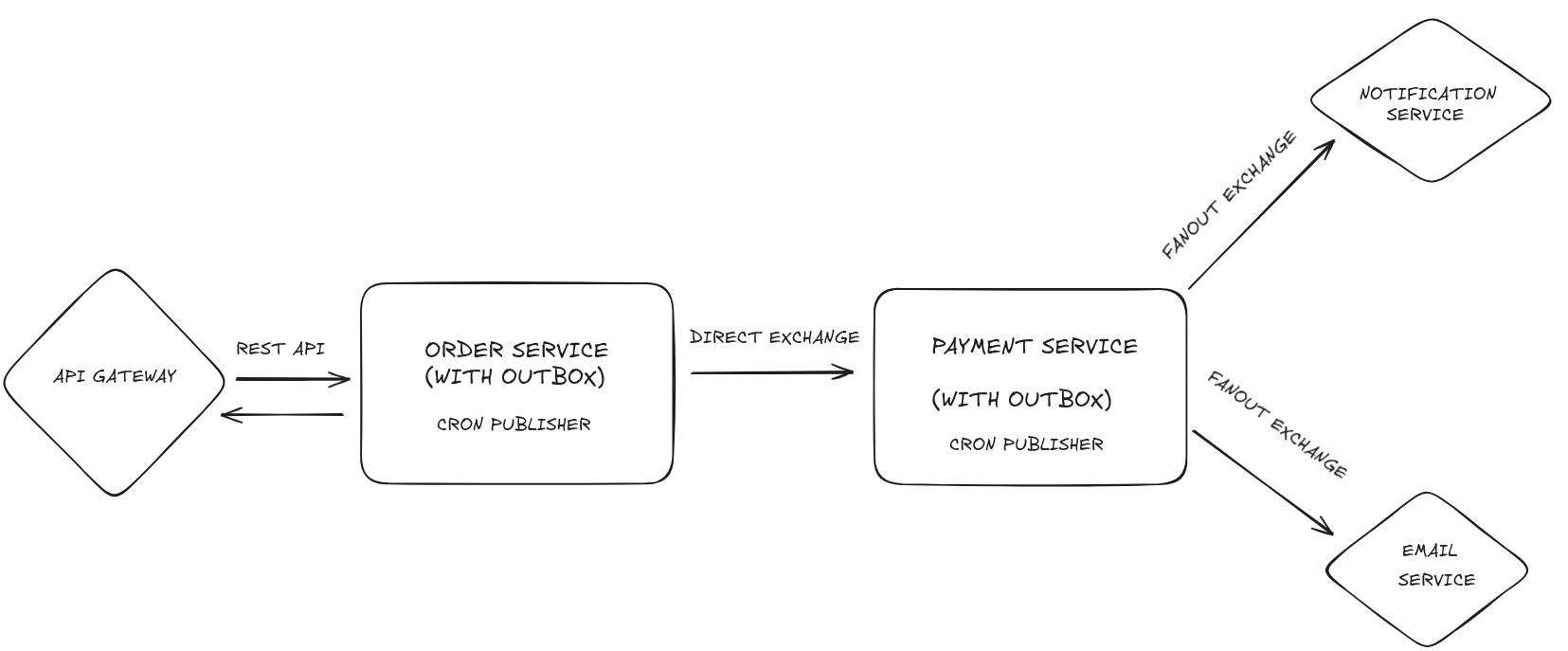
As you can see, we are planning to use the Outbox pattern for the most critical services: the Order Service and the Payment Service. Let's zoom in on one of them to see how we are going to implement it:
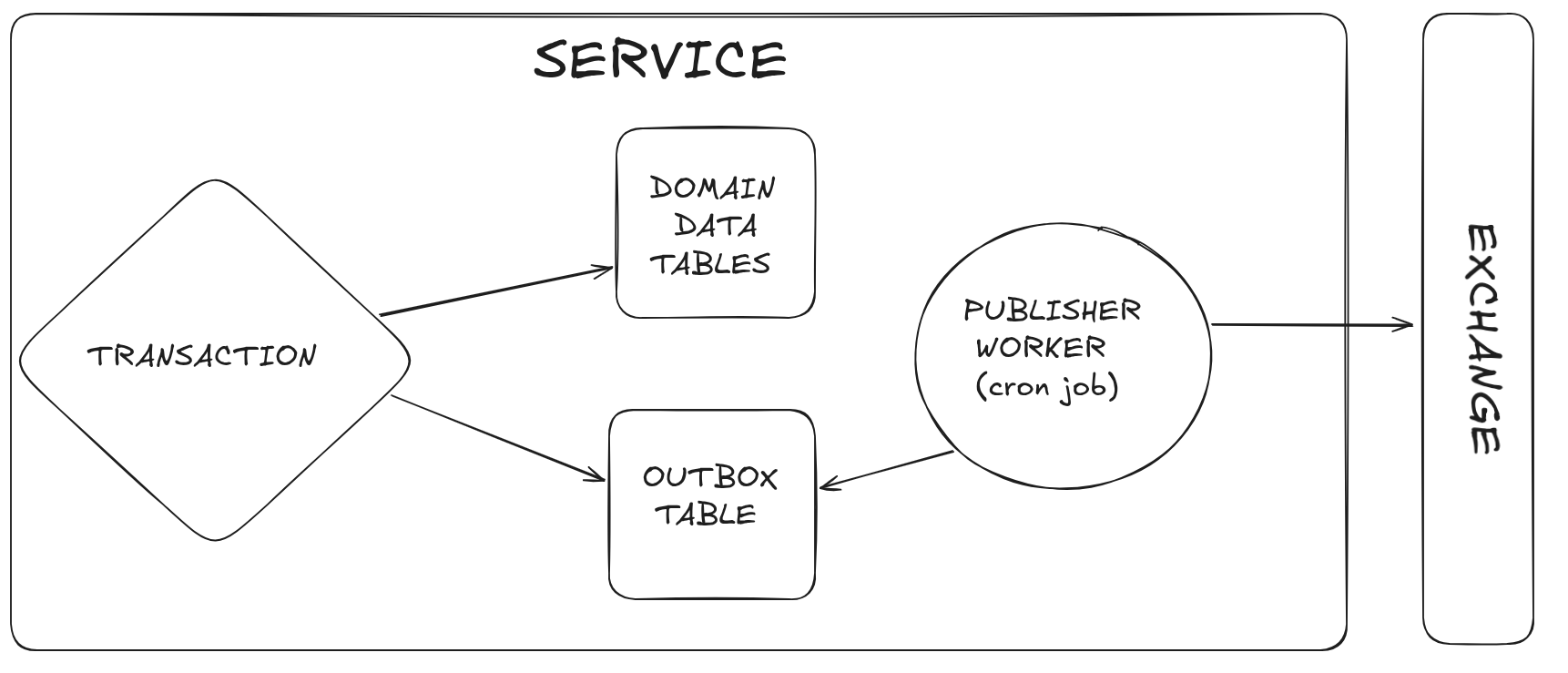
The service performs operations within a database transaction. Let's say there are things to compute while doing some back-and-forth with the DB. In our scenario, in the Order Service, we have to save the order in the DB, and in a real-world case we might also do inventory recalculations, ensure availability, etc. In the same transaction, after all domain operations, we will save the event in the outbox table. If something fails within the transaction (for example, order creation), the entire transaction will be rolled back and neither the order nor the outbox event will be saved. The last piece is handled by a publisher worker that, using a cron job, periodically checks for events to be published in the outbox table and, if it finds any, publishes the message to the exchange and updates the state of the outbox event in the outbox table.
Diving deep into the implementation
Alright, the implementation will be done in the NestJS framework, which is great for similar use cases due to its wide array of utilities and opinionated patterns. For clarity and explanatory reasons, we will not focus on the config, boilerplate, tests, and dependency details. The whole implementation will be accessible in this GitHub repo.
API Gateway
The simplest way to start with the API implementation will be to look at the controller.
typescript
// order.controller.ts
import {
  Controller,
  Post,
  Get,
  Body,
  Param,
  Query,
  HttpCode,
  HttpStatus,
  Headers,
  UseInterceptors,
} from "@nestjs/common";
import { CreateOrderDto } from "../dto/create-order.dto";
import { OrderDto } from "../dto/order.dto";
import { OrderService } from "../services/order.service";
import { IdempotencyKeyValidationInterceptor } from "../interceptors/idempotency-key-validation.interceptor";

@Controller("orders")
export class OrderController {
  constructor(private readonly orderService: OrderService) {}

  @Post()
  @HttpCode(HttpStatus.CREATED)
  @UseInterceptors(IdempotencyKeyValidationInterceptor)
  async createOrder(
    @Body() createOrderDto: CreateOrderDto,
    @Headers("idempotency-key") idempotencyKey?: string,
  ): Promise<OrderDto> {
    return this.orderService.createOrder({ createOrderDto, idempotencyKey });
  }

  @Get(":id")
  async getOrder(@Param("id") id: string): Promise<OrderDto> {
    return this.orderService.getOrder(id);
  }

  @Get()
  async getAllOrders(
    @Query("skip") skip: number = 0,
    @Query("take") take: number = 10,
  ): Promise<{ data: OrderDto[]; total: number }> {
    return this.orderService.getAllOrders(skip, take);
  }
}We have a couple of very typical handlers for placing an order, getting paginated orders, and fetching an order by id. We can also see one important thing, when it comes to payment systems: idempotency. Idempotency is crucial here to prevent data inconsistencies—for example, placing the same order twice.
Next, we will go to the OrderService to see how we create the order and communicate with the Order Service. So let's navigate to it via the createOrder method.
typescript
// order.service.ts

import { Injectable, HttpException, HttpStatus } from "@nestjs/common";
import { HttpService } from "@nestjs/axios";
import { firstValueFrom } from "rxjs";
import { CreateOrderDto } from "../dto/create-order.dto";
import { OrderDto } from "../dto/order.dto";

@Injectable()
export class OrderService {
  private readonly orderServiceUrl =
    process.env.ORDER_SERVICE_URL || "http://localhost:3001";

  constructor(private readonly httpService: HttpService) {}

  async createOrder({
    createOrderDto,
    idempotencyKey,
  }: {
    createOrderDto: CreateOrderDto;
    idempotencyKey?: string;
  }): Promise<OrderDto> {
    try {
      const headers: Record<string, string> = {};
      if (idempotencyKey) {
        headers["Idempotency-Key"] = idempotencyKey;
      }

      const response = await firstValueFrom(
        this.httpService.post<OrderDto>(
          `${this.orderServiceUrl}/orders`,
          createOrderDto,
          {
            headers,
          },
        ),
      );
      return response.data;
    } catch (error) {
      throw new HttpException(
        error.response?.data || "Failed to create order",
        error.response?.status || HttpStatus.INTERNAL_SERVER_ERROR,
      );
    }
  }

  // REST OF THE CODE ....
}What we see here is that we take the CreateOrderDto, extract the idempotencyKey from the headers, and call the Order Service via a POST request. To call the service we use a combination of @nestjs/axios and rxjs, which lets us handle the request without too much boilerplate. The response is delivered by resolving the observable.
Order Service
This is the place I mentioned when I was presenting the outbox pattern diagram. The task here is to receive the request to place an order, process the order, store an event in the outbox table, and send a message to the message broker.
OK, let's start with the controller, as we did previously.
typescript
// order.controller.ts
import {
  Controller,
  Post,
  Get,
  Body,
  Param,
  Query,
  HttpCode,
  HttpStatus,
  Headers,
  UseInterceptors,
} from "@nestjs/common";
import { CreateOrderDto } from "../dto/create-order.dto";
import { OrderDto } from "../dto/order.dto";
import { OrderService } from "../services/order.service";
import { IdempotencyKeyValidationInterceptor } from "../interceptors/idempotency-key-validation.interceptor";

@Controller("orders")
export class OrderController {
  constructor(private readonly orderService: OrderService) {}

  @Post()
  @HttpCode(HttpStatus.CREATED)
  @UseInterceptors(IdempotencyKeyValidationInterceptor)
  async createOrder(
    @Body() createOrderDto: CreateOrderDto,
    @Headers("idempotency-key") idempotencyKey?: string,
  ): Promise<OrderDto> {
    return this.orderService.createOrder({ createOrderDto, idempotencyKey });
  }

  @Get(":id")
  async getOrder(@Param("id") id: string): Promise<OrderDto> {
    return this.orderService.getOrder(id);
  }

  @Get()
  async getAllOrders(
    @Query("skip") skip: number = 0,
    @Query("take") take: number = 10,
  ): Promise<{ data: OrderDto[]; total: number }> {
    return this.orderService.getAllOrders(skip, take);
  }
}Since our API Gateway has the simplest possible form, the Order Service controller, at first glance, looks almost the same. In a real-world scenario, the API Gateway would have plenty of handlers that forward messages or requests to multiple services.
Let's navigate to the createOrder method:
typescript
//order.service.ts
import { Injectable } from "@nestjs/common";
import { InjectRepository } from "@nestjs/typeorm";
import { DataSource, Repository } from "typeorm";
import { OutboxEvent } from "@app/database";
import { Order } from "../entities";
import { CreateOrderDto } from "../dto/create-order.dto";
import { OrderDto } from "../dto/order.dto";
import { OrderRepository } from "../repositories/order.repository";
import { v4 as uuid } from "uuid";

@Injectable()
export class OrderService {
  constructor(
    private readonly orderRepository: OrderRepository,
    @InjectRepository(Order)
    private ordersRepository: Repository<Order>,
    private dataSource: DataSource,
  ) {}

  async createOrder(createOrderDto: CreateOrderDto): Promise<OrderDto> {
    const queryRunner = this.dataSource.createQueryRunner();
    await queryRunner.connect();
    await queryRunner.startTransaction();

    try {
      const order = queryRunner.manager.create(Order, {
        id: uuid(),
        userId: createOrderDto.userId,
        totalAmount: createOrderDto.totalAmount,
        currency: createOrderDto.currency,
        items: createOrderDto.items.map((item) => ({
          id: uuid(),
          productId: item.productId,
          quantity: item.quantity,
          unitPrice: item.unitPrice,
        })),
      });

      const savedOrder = await queryRunner.manager.save(order);

      const outboxEvent = queryRunner.manager.create(OutboxEvent, {
        id: uuid(),
        aggregateType: "Order",
        aggregateId: savedOrder.id,
        eventType: "OrderCreated",
        payload: {
          orderId: savedOrder.id,
          userId: savedOrder.userId,
          totalAmount: savedOrder.totalAmount,
          currency: savedOrder.currency,
          items: savedOrder.items.map((item) => ({
            productId: item.productId,
            quantity: item.quantity,
            unitPrice: item.unitPrice,
          })),
        },
      });

      await queryRunner.manager.save(outboxEvent);

      await queryRunner.commitTransaction();

      const fullOrder = await this.orderRepository.findByIdWithItems(
        savedOrder.id,
      );
      return this.mapToDto(fullOrder);
    } catch (error) {
      await queryRunner.rollbackTransaction();
      throw error;
    } finally {
      await queryRunner.release();
    }
  }
  // REST OF THE CODE ...
}At the beginning of the operation we open the transaction and insert the new order record to the db. Within the same transaction we also insert the outbox event. In that way we sleep without worries as we now when something goes wrong inside transaction no event will be published. This example is very simple but if you imagine that if there were be more db operations, computations, branching, there would be more reasons to trow an error, so without the transaction db state would be left inconsistent and likely message would be sent to the message broker spreading chaos in the system.
As you can see, the pattern produces an event but doesn't send it to the message broker yet. To do that, we need a worker that leverages the message broker.
Message Relay for the Order Service
There are at least two ways for handling the outbox events:
- Change Data Capture (CDC) - capture changes in the outbox table; once a change is detected, the message is published via message broker integration.
- Polling - a worker runs in the background, polling the outbox table; once an event is published, it sends the message via the message broker and marks the outbox event as done.
We will focus on option 2.
Navigate to the module file to see how the publisher worker is integrated into the Order Service.
typescript
import { Module } from "@nestjs/common";
import { ConfigModule } from "@nestjs/config";
import { TypeOrmModule } from "@nestjs/typeorm";
import { ScheduleModule } from "@nestjs/schedule";
import { DatabaseModule, OutboxEvent, IdempotencyRecord } from "@app/database";
import { MessagingModule } from "@app/messaging";
import { Order, OrderItem } from "./entities";
import { OrderController } from "./controllers/order.controller";
import { OrderService } from "./services/order.service";
import { OrderRepository } from "./repositories/order.repository";
import { IdempotencyService } from "./services/idempotency.service";
import { IdempotencyInterceptor } from "./interceptors/idempotency.interceptor";

@Module({
  imports: [
    ConfigModule.forRoot({ envFilePath: ".env.order" }),
    DatabaseModule,
    TypeOrmModule.forFeature([
      Order,
      OrderItem,
      OutboxEvent,
      IdempotencyRecord,
    ]),
    ScheduleModule.forRoot(),
    MessagingModule.forDirectProducer({
      clientToken: "ORDER_SERVICE",
      queue: "payment_service_queue",
      patternTransformer: (eventType) =>
        eventType
          .replace(/([A-Z])/g, ".$1")
          .toLowerCase()
          .slice(1),
    }),
  ],
  controllers: [OrderController],
  providers: [
    OrderService,
    OrderRepository,
    IdempotencyService,
    IdempotencyInterceptor,
  ],
  exports: [OrderService, OrderRepository],
})
export class OrderServiceModule {}Look closely at the imports. The thing responsible for reading outbox events and sending messages to the message broker is the MessagingModule, where we call the forDirectProducer method. You can see it takes the message broker configuration, and the word "direct" suggests this producer targets a direct exchange/routing style.
Let's go deeper and see what the forDirectProducer method has under the hood.
typescript
// messaging.module.ts

// REST OF THE CODE...

@Module({})
export class MessagingModule {
  static forDirectProducer({
    clientToken,
    queue,
    patternTransformer,
  }: DirectProducerOptions): DynamicModule {
    return {
      module: MessagingModule,
      imports: [
        TypeOrmModule.forFeature([OutboxEvent]),
        ClientsModule.register([
          {
            name: clientToken,
            ...getRabbitMQConfig({ queue, noAck: true }),
          },
        ]),
      ],
      providers: [
        OutboxPublisher,
        OutboxPublisherWorker,
        {
          provide: "DIRECT_CLIENT",
          useExisting: clientToken,
        },
        DirectPublisher,
        {
          provide: "OUTBOX_MESSAGE_PUBLISHER",
          useExisting: DirectPublisher,
        },
        {
          provide: "OUTBOX_EVENT_PATTERN_TRANSFORMER",
          useValue: patternTransformer,
        },
      ],
      exports: [OutboxPublisher, OutboxPublisherWorker],
    };
  }
  // REST OF THE CODE...
}This method is a factory function that returns a dynamic module that registers the polling worker and its dependencies. In this case, it wires up the polling worker.
To see the implementation of the polling worker, we should start with the OutboxPublisherWorker.
typescript
// outbox-publisher-worker.ts

import { Injectable, Logger, Inject } from "@nestjs/common";
import { Cron, CronExpression } from "@nestjs/schedule";
import { OutboxPublisher } from "./outbox-publisher";

type MessagePublisher = {
  publish(pattern: string, message: Record<string, any>): Promise<void>;
};

@Injectable()
export class OutboxPublisherWorker {
  private readonly logger = new Logger(OutboxPublisherWorker.name);
  private isProcessing = false;

  constructor(
    @Inject("OUTBOX_MESSAGE_PUBLISHER")
    private readonly messagePublisher: MessagePublisher,
    private readonly outboxPublisher: OutboxPublisher,
    @Inject("OUTBOX_EVENT_PATTERN_TRANSFORMER")
    private readonly transformPattern: (eventType: string) => string,
  ) {}

  @Cron(CronExpression.EVERY_5_SECONDS)
  async publishPendingEvents() {
    if (this.isProcessing) {
      this.logger.warn(
        "Previous outbox processing still running, skipping this cycle",
      );
      return;
    }

    this.isProcessing = true;

    try {
      const { claimId, events } =
        await this.outboxPublisher.claimPendingEvents();
      if (events.length === 0) {
        return;
      }

      this.logger.log(`Claimed ${events.length} events (claimId: ${claimId})`);

      for (const event of events) {
        try {
          const pattern = this.transformPattern(event.eventType);
          const message = {
            id: event.id,
            ...event.payload,
          };

          await this.messagePublisher.publish(pattern, message);

          await this.outboxPublisher.markEventAsSent({
            eventId: event.id,
            claimId,
          });
          this.logger.log(
            `Published event ${event.id} of type ${event.eventType}`,
          );
        } catch (error) {
          this.logger.error(
            `Failed to publish event ${event.id}, will retry:`,
            error,
          );
          await this.outboxPublisher.markEventAsFailed({
            eventId: event.id,
            claimId,
            retryCount: event.retryCount + 1,
          });
        }
      }
    } catch (error) {
      this.logger.error("Error in OutboxPublisherWorker:", error);
    } finally {
      this.isProcessing = false;
    }
  }
}As I mentioned before, the worker leverages a cron job. The polling is set to run every 5 seconds.
The flow is very simple: the worker claims outbox events that need to be sent by calling a method on the OutboxPublisher service:
typescript
// outbox-publisher.ts
// REST OF THE CODE...
async claimPendingEvents(batchSize: number = 50): Promise<ClaimResult> {
    const claimId = uuid();

    const events = await this.dataSource.transaction(async (manager) => {
      const lockedRows: Array<{ id: string }> = await manager.query(
        `SELECT id FROM outbox_events
         WHERE status = $1
         ORDER BY "createdAt" ASC
         LIMIT $2
         FOR UPDATE SKIP LOCKED`,
        [OutboxEventStatus.PENDING, batchSize]
      );

      if (lockedRows.length === 0) {
        return [];
      }

      const ids = lockedRows.map((row) => row.id);

      await manager.query(
        `UPDATE outbox_events
         SET status = $1,
             "processingClaim" = $2,
             "processingStartedAt" = now()
         WHERE id = ANY($3)`,
        [OutboxEventStatus.PROCESSING, claimId, ids]
      );

      return manager.getRepository(OutboxEvent).find({
        where: { processingClaim: claimId, status: OutboxEventStatus.PROCESSING },
        order: { createdAt: 'ASC' },
      });
    });

    return { claimId, events };
  }

// REST OF THE CODE...In this method, two things are done:
- retrieving pending events
- marking their status as processing
The acquired events are being published to the message broker and then either mark as sent or mark as failed if message broker fails.
typescript
// outbox-publisher.ts
// REST OF THE CODE...
  async markEventAsSent({ eventId, claimId }: { eventId: string; claimId: string }): Promise<void> {
    await this.dataSource.getRepository(OutboxEvent).update(
      { id: eventId, processingClaim: claimId },
      {
        status: OutboxEventStatus.SENT,
        processedAt: new Date(),
        processingClaim: null,
        processingStartedAt: null,
      }
    );
  }

  async markEventAsFailed({
    eventId,
    claimId,
    retryCount,
  }: {
    eventId: string;
    claimId: string;
    retryCount: number;
  }): Promise<void> {
    if (retryCount >= 5) {
      await this.dataSource.getRepository(OutboxEvent).update(
        { id: eventId, processingClaim: claimId },
        {
          status: OutboxEventStatus.FAILED,
          retryCount,
          processingClaim: null,
          processingStartedAt: null,
        }
      );
    } else {
      await this.dataSource.getRepository(OutboxEvent).update(
        { id: eventId, processingClaim: claimId },
        {
          status: OutboxEventStatus.PENDING,
          retryCount,
          processingClaim: null,
          processingStartedAt: null,
        }
      );
    }
  }
// REST OF THE CODE...Payment Service
This is the second most important service: it processes the payment. The Payment Service is, the consumer of the Order Service. Let's quickly look at how the service consumes the message from the message broker:
typescript
// order-created.consumer.ts
import { Controller, Logger } from "@nestjs/common";
import { EventPattern, Payload } from "@nestjs/microservices";
import { PaymentService } from "../services/payment.service";
import { ProcessedEventRepository } from "@app/messaging";

@Controller()
export class OrderCreatedConsumer {
  private readonly logger = new Logger(OrderCreatedConsumer.name);

  constructor(
    private readonly paymentService: PaymentService,
    private readonly processedEventRepository: ProcessedEventRepository,
  ) {}

  @EventPattern("order.created")
  async handleOrderCreated(
    @Payload()
    message: {
      id: string;
      orderId: string;
      userId: string;
      totalAmount: number;
      currency: string;
      items: Array<{
        productId: string;
        quantity: number;
        unitPrice: number;
      }>;
    },
  ) {
    try {
      const consumerId = "payment-service";
      const processed = await this.processedEventRepository.findProcessedEvent(
        message.id,
        consumerId,
      );

      if (processed) {
        this.logger.warn(
          `Event ${message.id} already processed by ${consumerId}`,
        );
        return;
      }

      this.logger.log(
        `Processing OrderCreated event for order ${message.orderId}`,
      );

      await this.paymentService.processPayment(
        message.orderId,
        message.totalAmount,
        message.currency,
      );

      await this.processedEventRepository.markAsProcessed(
        message.id,
        consumerId,
      );

      this.logger.log(
        `Successfully processed OrderCreated event for order ${message.orderId}`,
      );
    } catch (error) {
      this.logger.error(`Error processing OrderCreated event:`, error);
    }
  }
}The consumer receives the message and triggers PaymentService.processPayment, which is another feature that uses the outbox pattern.
Let's see what we have here:
typescript
//payment.service.ts
import { Injectable, Logger } from "@nestjs/common";
import { InjectRepository } from "@nestjs/typeorm";
import { DataSource, Repository } from "typeorm";
import { Payment, PaymentAttempt, PaymentStatus } from "../entities";
import { OutboxEvent } from "@app/database";
import { PaymentDto } from "../dto/payment.dto";
import { PaymentRepository } from "../repositories/payment.repository";
import { PaymentAttemptRepository } from "../repositories/payment-attempt.repository";
import { v4 as uuid } from "uuid";

type PaymentProviderRequest = {
  amount: number;
  currency: string;
};

@Injectable()
export class PaymentService {
  private readonly logger = new Logger(PaymentService.name);

  constructor(
    private readonly paymentRepository: PaymentRepository,
    private readonly paymentAttemptRepository: PaymentAttemptRepository,
    @InjectRepository(Payment)
    private paymentsRepository: Repository<Payment>,
    @InjectRepository(PaymentAttempt)
    private paymentAttemptsRepository: Repository<PaymentAttempt>,
    private dataSource: DataSource,
  ) {}

  async processPayment(
    orderId: string,
    amount: number,
    currency: string,
  ): Promise<PaymentDto> {
    const queryRunner = this.dataSource.createQueryRunner();
    await queryRunner.connect();
    await queryRunner.startTransaction();

    try {
      const existingPayment =
        await this.paymentRepository.findByOrderId(orderId);
      if (existingPayment) {
        this.logger.warn(`Payment already exists for order ${orderId}`);
        return this.mapToDto(existingPayment);
      }

      const payment = queryRunner.manager.create(Payment, {
        id: uuid(),
        orderId,
        amount,
        currency,
        status: PaymentStatus.PROCESSING,
      });

      const savedPayment = await queryRunner.manager.save(payment);

      const paymentResult = await this.callPaymentProvider({
        amount,
        currency,
      });

      const updatedPayment = { ...savedPayment };
      if (paymentResult.success) {
        updatedPayment.status = PaymentStatus.COMPLETED;
        updatedPayment.externalPaymentId = paymentResult.transactionId;
      } else {
        updatedPayment.status = PaymentStatus.FAILED;
      }

      const paymentUpdate = queryRunner.manager.create(Payment, updatedPayment);
      const finalPayment = await queryRunner.manager.save(paymentUpdate);

      const outboxEvent = queryRunner.manager.create(OutboxEvent, {
        id: uuid(),
        aggregateType: "Payment",
        aggregateId: finalPayment.id,
        eventType: paymentResult.success ? "PaymentCompleted" : "PaymentFailed",
        payload: paymentResult.success
          ? {
              paymentId: finalPayment.id,
              orderId: finalPayment.orderId,
              amount: finalPayment.amount,
              currency: finalPayment.currency,
              transactionId: paymentResult.transactionId,
            }
          : {
              paymentId: finalPayment.id,
              orderId: finalPayment.orderId,
              reason: paymentResult.error,
            },
      });

      await queryRunner.manager.save(outboxEvent);

      if (!paymentResult.success) {
        const attempt = queryRunner.manager.create(PaymentAttempt, {
          id: uuid(),
          paymentId: finalPayment.id,
          attemptNumber: 1,
          errorMessage: paymentResult.error,
        });
        await queryRunner.manager.save(attempt);
      }

      await queryRunner.commitTransaction();

      return this.mapToDto(finalPayment);
    } catch (error) {
      await queryRunner.rollbackTransaction();
      this.logger.error(
        `Error processing payment for order ${orderId}:`,
        error,
      );
      throw error;
    } finally {
      await queryRunner.release();
    }
  }

  async getPaymentByOrderId(orderId: string): Promise<PaymentDto | null> {
    const payment = await this.paymentRepository.findByOrderId(orderId);
    if (!payment) {
      return null;
    }
    return this.mapToDto(payment);
  }

  private async callPaymentProvider({
    amount,
    currency,
  }: PaymentProviderRequest) {
    const pollCount = 3;
    const jitter = (amount % 100) + currency.length;

    for (let attempt = 1; attempt <= pollCount; attempt += 1) {
      await this.wait(250 + attempt * 150 + (jitter % 50));
      const random = Math.random();

      if (random > 0.7) {
        return {
          success: true,
          transactionId: `txn_${uuid()}`,
        };
      }
    }

    return {
      success: false,
      error: "Payment provider temporarily unavailable",
    };
  }

  private wait(ms: number) {
    return new Promise<void>((resolve) => setTimeout(resolve, ms));
  }

  private mapToDto(payment: Payment): PaymentDto {
    return {
      id: payment.id,
      orderId: payment.orderId,
      amount: Number(payment.amount),
      currency: payment.currency,
      status: payment.status,
      externalPaymentId: payment.externalPaymentId,
      createdAt: payment.createdAt,
      updatedAt: payment.updatedAt,
    };
  }
}The idea is the same as in the Order Service. Open the transaction, start polling a payment provider (here we poll the payment provider for simplicity and explanatory purposes by calling a function that mocks this behavior; the outbox pattern can also be used in the webhook that receives notifications about transaction resolution), insert the outbox event with the status depending on the payment success, and if the payment is not successful, also save the payment attempt.
Message Relay for the Payment Service
The rest of the flow for the Payment Service is to add the last piece of the outbox pattern and create the publisher that will notify the rest of the services (Notification Service and Email Service).
In this case, we have to reach for a fanout exchange. For that, we use the forFanoutProducer method of the MessagingModule.
The full setup for the Payment Service module looks like:
typescript
// payment-service/app/module.ts

import { Module } from "@nestjs/common";
import { ConfigModule } from "@nestjs/config";
import { TypeOrmModule } from "@nestjs/typeorm";
import { ScheduleModule } from "@nestjs/schedule";
import { DatabaseModule, OutboxEvent, ProcessedEvent } from "@app/database";
import { MessagingModule } from "@app/messaging";
import { Payment, PaymentAttempt } from "./entities";
import { PaymentService } from "./services/payment.service";
import { PaymentRepository } from "./repositories/payment.repository";
import { PaymentAttemptRepository } from "./repositories/payment-attempt.repository";
import { OrderCreatedConsumer } from "./consumers/order-created.consumer";

@Module({
  imports: [
    ConfigModule.forRoot({ envFilePath: ".env.payment" }),
    DatabaseModule,
    TypeOrmModule.forFeature([
      Payment,
      PaymentAttempt,
      OutboxEvent,
      ProcessedEvent,
    ]),
    ScheduleModule.forRoot(),
    MessagingModule.forFanoutProducer({
      exchange: "payment.events",
      patternTransformer: (eventType) => `payment.${eventType.toLowerCase()}`,
    }),
    MessagingModule.forConsumer(),
  ],
  controllers: [OrderCreatedConsumer],
  providers: [PaymentService, PaymentRepository, PaymentAttemptRepository],
  exports: [PaymentService, PaymentRepository],
})
export class PaymentServiceModule {}The MessagingModule allows us to use RabbitMQ both as a consumer and as a producer targeting a fanout exchange. Under the hood, the same class (OutboxPublisherWorker) is used. I showed it when discussing the message relay for the Order Service.
Notification and Email Service
At this place we can safely notify user by sending a notification and email about payment and be sure that the state of the data in our system is consistent and up to date.
Email service:
typescript
// REST OF THE CODE...
@Controller()
export class PaymentCompletedConsumer {
  private readonly logger = new Logger(PaymentCompletedConsumer.name);

  constructor(
    private readonly emailService: EmailService,
    private readonly processedEventRepository: ProcessedEventRepository,
  ) {}

  @EventPattern("payment.paymentcompleted")
  async handlePaymentCompleted(
    @Payload()
    message: PaymentCompletedEvent & { id: string },
  ) {
    // REST OF THE CODE...
    try {
      await this.emailService.sendConfirmationEmail({
        orderId: message.orderId,
        eventId: message.id,
        paymentId: message.paymentId,
        amount: message.amount,
        currency: message.currency,
        transactionId: message.transactionId,
      });

      this.logger.log(
        `Successfully processed PaymentCompleted event for order ${message.orderId}`,
      );

      // REST OF THE CODE...
    } catch (error) {
      this.logger.error(`Error processing PaymentCompleted event:`, error);
    }
  }
}Notification service:
typescript
// REST OF THE CODE...

@Controller()
export class PaymentCompletedConsumer {
  private readonly logger = new Logger(PaymentCompletedConsumer.name);

  constructor(
    private readonly notificationService: NotificationService,
    private readonly processedEventRepository: ProcessedEventRepository,
  ) {}

  @EventPattern("payment.paymentcompleted")
  async handlePaymentCompleted(
    @Payload()
    message: PaymentCompletedEvent & { id: string },
  ) {
    // REST OF THE CODE...
    try {
      await this.notificationService.sendNotification({
        orderId: message.orderId,
        eventId: message.id,
        paymentId: message.paymentId,
        amount: message.amount,
        currency: message.currency,
        transactionId: message.transactionId,
      });

      await this.processedEventRepository.markAsProcessed(
        message.id,
        consumerId,
      );

      // REST OF THE CODE...
      this.logger.log(
        `Successfully processed PaymentCompleted event for order ${message.orderId}`,
      );
    } catch (error) {
      this.logger.error(`Error processing PaymentCompleted event:`, error);
    }
  }
}Summary
What have we achieved by implementing outbox pattern here? We’ve definitely tackled the dual-write problem by ensuring consistency, and we’ve also avoided distributed transactions, which are a real pain when it comes to complexity and maintainability. These achievements are not just words and terminology—they’re critical business value. They help ensure the feature won’t cause financial loss or reputational damage, and they also make it easier to maintain and monitor. Using the right patterns and tools for the problem helps a lot when building reliable systems, and it makes systems that look complex at first glance easier to build and understand. Learn established, battle-tested patterns, then think about where and why to use them, then build with them—and you’ll see that some complex system designs will no longer feel complex to you.
PS: Check out the whole GitHub repo here.